
Salesforce Reporting
Salesforce Reporting has many great qualities and abilities to help customers visualize their data, but sometimes that report you started to build just does not cut it due to missing fields.
When creating a salesforce report it is important to know what your end goal is.
For Example:
“I want to be able to see all My Accounts” (use an Account Report Type)
“I want to be able to see all my Cases” (use a Case Report Type)
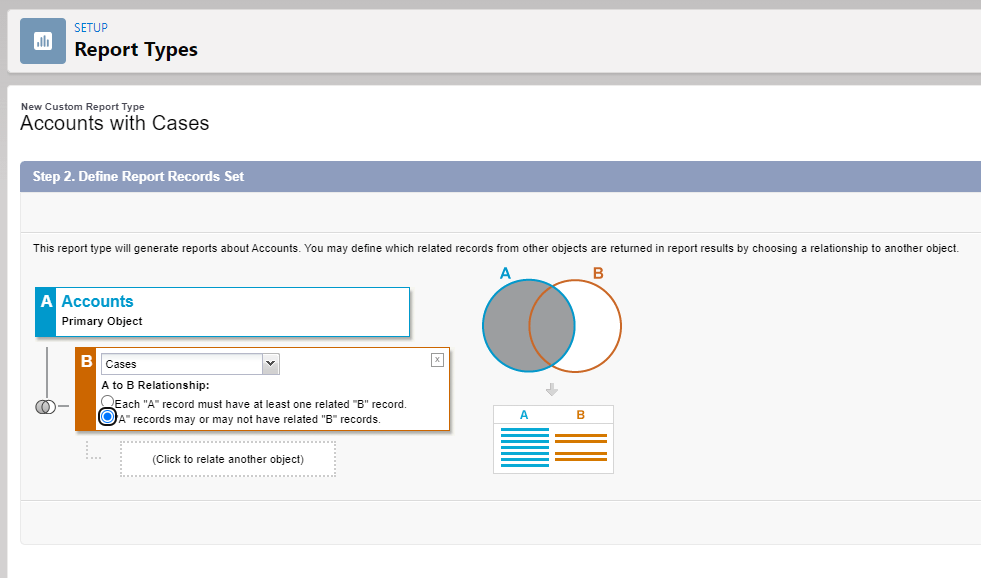
To do this Salesforce provides the ability to select a Report Type and you can even create your own custom report types seen below:

Often times you spend a heavy amount of time building out a report to realize after you hit run that it is missing that related object or related field from the account. So close but so far away. So the next step is you try to create a custom report type.
Creating the custom report type can leave you at a loss when, for example, the object model is not showing the related object relationship you need and you can not get the right combination of joins.
Resolution:
Salesforce has a somewhat hidden setting on the Report Types called Field Layouts. Within the Report Type navigate down to the “Fields Available for Reports” Section.
Select the Edit Layout Button

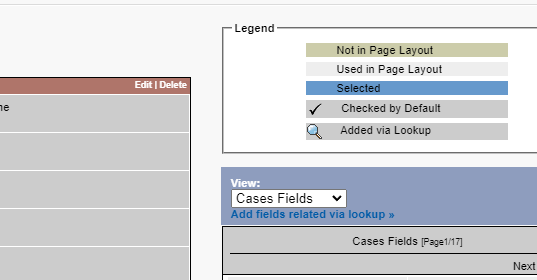
On this Layout Screen you can see all the fields currently available for the Report and also any fields that you have not added to the report. This is where you can add those fields to the report for the core Report Type Object Fields.
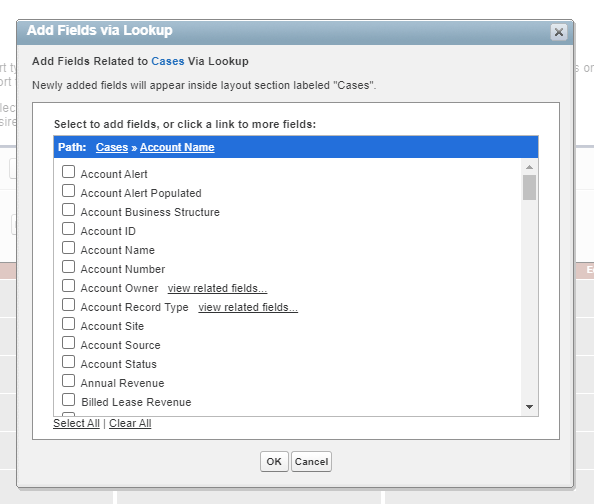
There is a hyperlink on the right-side of the page called “Add fields related via lookup”. This is where you will be able to bring in other objects and fields of those objects without having to have them in the source report type. The only requirement is that the report type object must have a Lookup relationship with the objects.
Select the Related Object : In the example below we chose the cases report type > Account Lookup. Notice all the fields we can now bring into this report by selecting the checkbox as needed.
This will allow Salesforce Admins and Salesforce Consultants to take salesforce reporting to the next level. You will no longer tell the customer that you can not add that field because of the Report Type is incorrect.
 SalesforceThink
Leave a comment